
 German
  French
  English
  Spanish
  Chinese
  Japanese
  Korean
  Hindi
Hindi  Norwegian
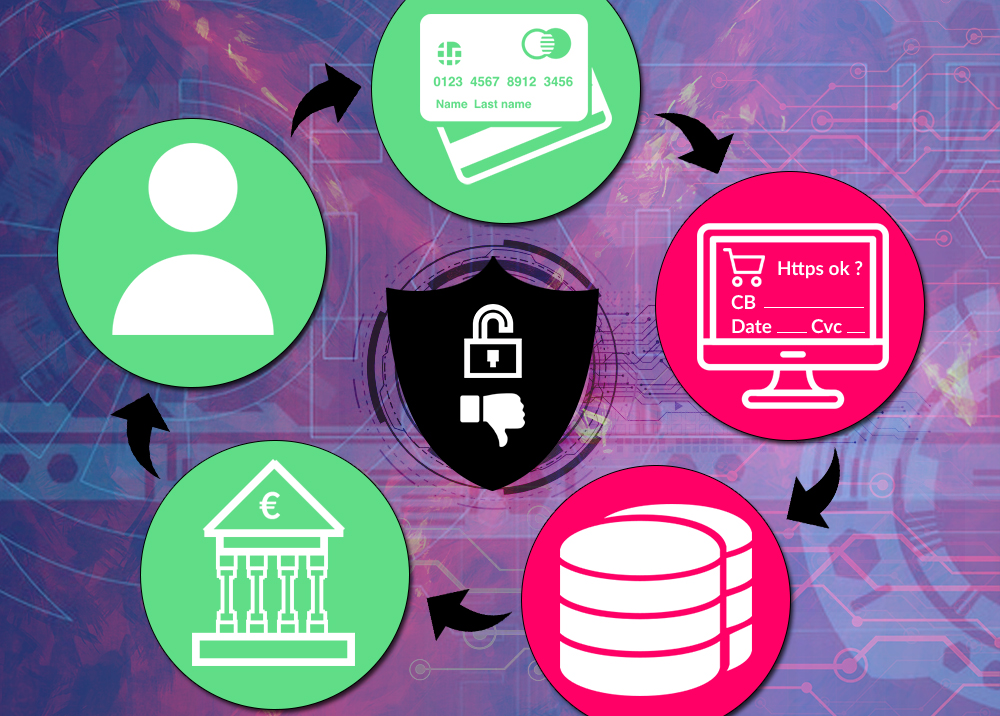
Online payment directly inside the merchant website
As a web developer, I have faced this choice several times. I build my websites from A to Z, without using prebuilt CMS platforms such as Wordpress, Prestashop, Drupal, etc.
When one of my clients wants to add online payment to their website, I ask them to choose, depending on their bank, the online payment engine they want to use, such as Sogecommerce or Merkanet, and I develop the whole integration.
During the development of the system used to integrate online payment, these engines offer several options, including two very distinct methods:
- Offer a link button that points to the bank’s payment page, sending a cart ID, a price and other payment information. The customer clicks the card button, goes to another site, enters the information, then returns to the merchant site or not.
- Ask for the card number directly on the merchant site, then send the card number, expiry date and CVC to the bank along with the usual information. The customer enters card details on the merchant page, and the site can process or potentially store them.
Personally, I encourage my clients to choose the version where the customer's card is not requested directly on the site page, to avoid possible legal and security problems. The real difference is that in the second option, your site is able to store customers’ bank card information in its database, which I find very borderline.
If some sites, even honest ones, want to store their customers’ payment methods, it is to speed up the next purchase by a couple of clicks. But the customer clearly takes a risk: the site may be malicious, hacked, or a departing employee may copy card numbers.
Some will answer that HTTPS and the browser padlock mean the site is secure. But HTTPS mainly protects transmission; it does not prove that the merchant safely handles the data afterward.
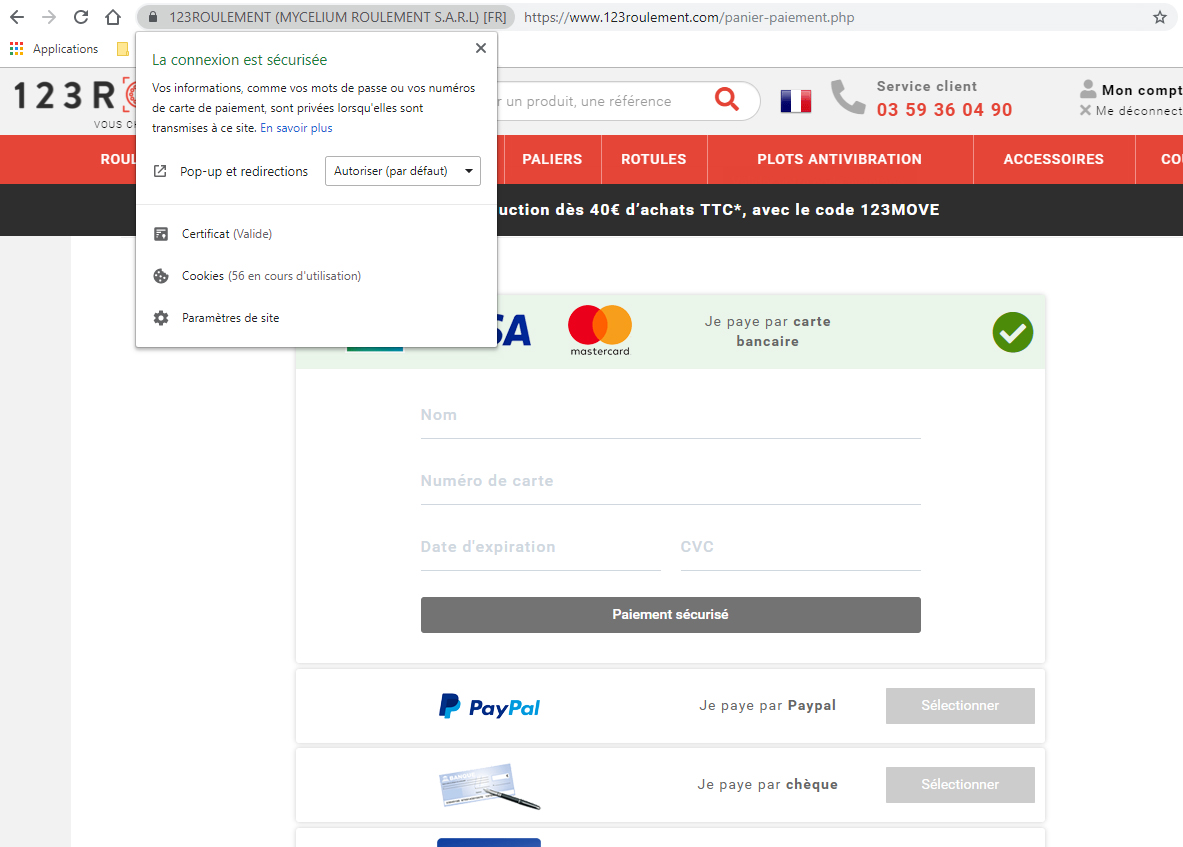
If your card is stolen after being used, you can file a complaint, but in the end the card number is already in the wild and money may have been lost.
Others mention SMS payment validation. But you are not fully protected either, because some foreign sites do not trigger mobile verification, and SMS-based security can also be attacked.
To sum up, if a website asks for your card information directly on its own pages, often under the cart summary, I would advise avoiding entering it unless you fully trust that site. The safest option is to pay on a page whose URL belongs to a real bank, outside the merchant website.
Otherwise, you also often have the PayPal option. You do not necessarily need a PayPal account to use it; during payment on PayPal, you can enter your card details directly, without extra fees for you.



Online payment directly inside the merchant website
As a web developer, I have faced this choice several times. I build my websites from A to Z, without using prebuilt CMS platforms such as Wordpress, Prestashop, Drupal, etc.
When one of my clients wants to add online payment to their website, I ask them to choose, depending on their bank, the online payment engine they want to use, such as Sogecommerce or Merkanet, and I develop the whole integration.
During the development of the system used to integrate online payment, these engines offer several options, including two very distinct methods:
- Offer a link button that points to the bank’s payment page, sending a cart ID, a price and other payment information. The customer clicks the card button, goes to another site, enters the information, then returns to the merchant site or not.
- Ask for the card number directly on the merchant site, then send the card number, expiry date and CVC to the bank along with the usual information. The customer enters card details on the merchant page, and the site can process or potentially store them.
Personally, I encourage my clients to choose the version where the customer's card is not requested directly on the site page, to avoid possible legal and security problems. The real difference is that in the second option, your site is able to store customers’ bank card information in its database, which I find very borderline.
If some sites, even honest ones, want to store their customers’ payment methods, it is to speed up the next purchase by a couple of clicks. But the customer clearly takes a risk: the site may be malicious, hacked, or a departing employee may copy card numbers.
Some will answer that HTTPS and the browser padlock mean the site is secure. But HTTPS mainly protects transmission; it does not prove that the merchant safely handles the data afterward.
If your card is stolen after being used, you can file a complaint, but in the end the card number is already in the wild and money may have been lost.
Others mention SMS payment validation. But you are not fully protected either, because some foreign sites do not trigger mobile verification, and SMS-based security can also be attacked.
To sum up, if a website asks for your card information directly on its own pages, often under the cart summary, I would advise avoiding entering it unless you fully trust that site. The safest option is to pay on a page whose URL belongs to a real bank, outside the merchant website.
Otherwise, you also often have the PayPal option. You do not necessarily need a PayPal account to use it; during payment on PayPal, you can enter your card details directly, without extra fees for you.
Online payment directly inside the merchant website
As a web developer, I have faced this choice several times. I build my websites from A to Z, without using prebuilt CMS platforms such as Wordpress, Prestashop, Drupal, etc.
When one of my clients wants to add online payment to their website, I ask them to choose, depending on their bank, the online payment engine they want to use, such as Sogecommerce or Merkanet, and I develop the whole integration.
During the development of the system used to integrate online payment, these engines offer several options, including two very distinct methods:
- Offer a link button that points to the bank’s payment page, sending a cart ID, a price and other payment information. The customer clicks the card button, goes to another site, enters the information, then returns to the merchant site or not.
- Ask for the card number directly on the merchant site, then send the card number, expiry date and CVC to the bank along with the usual information. The customer enters card details on the merchant page, and the site can process or potentially store them.
Personally, I encourage my clients to choose the version where the customer's card is not requested directly on the site page, to avoid possible legal and security problems. The real difference is that in the second option, your site is able to store customers’ bank card information in its database, which I find very borderline.
If some sites, even honest ones, want to store their customers’ payment methods, it is to speed up the next purchase by a couple of clicks. But the customer clearly takes a risk: the site may be malicious, hacked, or a departing employee may copy card numbers.
Some will answer that HTTPS and the browser padlock mean the site is secure. But HTTPS mainly protects transmission; it does not prove that the merchant safely handles the data afterward.
If your card is stolen after being used, you can file a complaint, but in the end the card number is already in the wild and money may have been lost.
Others mention SMS payment validation. But you are not fully protected either, because some foreign sites do not trigger mobile verification, and SMS-based security can also be attacked.
To sum up, if a website asks for your card information directly on its own pages, often under the cart summary, I would advise avoiding entering it unless you fully trust that site. The safest option is to pay on a page whose URL belongs to a real bank, outside the merchant website.
Otherwise, you also often have the PayPal option. You do not necessarily need a PayPal account to use it; during payment on PayPal, you can enter your card details directly, without extra fees for you.